Code
from hydromod.constants import STEP_FACTOR

print(STEP_FACTOR)0.01Before diving into the exercises, some practical information is provided on how to effectively set up your working environment and how these exercises will be evaluated.
All code used to create this assignment is available at https://github.com/h-cel/hydrological-modelling-public. This collection of files is called a repository. To get started, go to the URL above, click on the green Code button and select Download ZIP (see Figure 2.1). Unzip the downloaded file and place the resulting folder at a location of your choice. This folder contains all the files you need to complete the exercises.
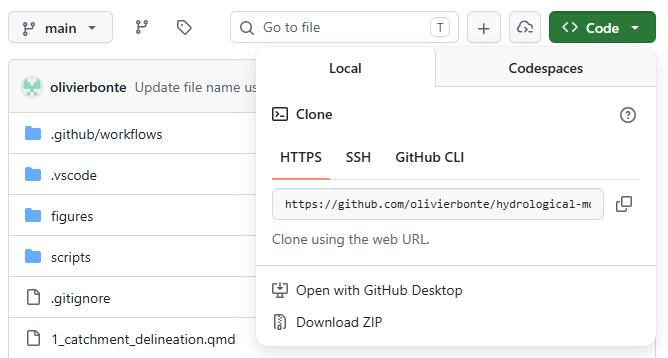
Note that not only the code, but also the processed data is now downloaded. You can find this data in data/processed. More info on the data sources and processing is given in Chapter 3.
This assignment is provided to you in two formats, up to you which one you prefer to work with:
Throughout the assignment, text formatted as
A hint
contains tips and recommendations to help you with the exercises. If you need an extra challenge, you can find these in text blocks formatted as
These challenges are always optional and are meant for those who are interested.
For general introductions, please refer to the following resources:
Make sure to use the conda environment provided in environment.yml. After following the guides above, you should be able to run the code in the .qmd files and render them into a PDF report.
The idea of this exercise set is that you will use Quarto to combine your code and your scientific report in a single document. The goal is to write a report following the principles of reproducible research1, where others have access to all the data and code needed to obtain the same results as the one you present.
In these practicals, you will therefore not write a report from scratch (in Microsoft Word, Google Docs…), but instead you’ll extend the provided .qmd files for each exercise. The files of interest are numbered from 1_...qmd to 6_...qmd. Here you can add Python code2 for your figures and write your discussion in Markdown.
Don’t perform all your computations inside of the .qmd files! Instead, make a regular .py file inside of the scripts folder for each exercise. From these .py files, you can save the results (e.g. metrics, output data) in (for example) a data/solutions folder. From this folder, you can then import the necessary results in the .qmd files to write your report and make your figures.
For functions that you reuse across multiple exercises, it is recommended to add these in a .py file inside of the src/hydromod folder. This way, you can easily import these both in your .qmd files and in .py files inside the scripts folder. For example, in src/hydromod/constants.py, a constant STEP_FACTOR is defined. We can import this constant here by using:
from hydromod.constants import STEP_FACTOR
print(STEP_FACTOR)0.01The evaluation of your work will be both orally and in writing. Both forms of evaluation expect individual submissions/participation, but you are of course strongly encouraged to discuss the exercises with your colleagues during the practicals.
For the written examination, hand in the following by Sunday 13/12 23:59 on Ufora:
.zip file.By Tuesday 10/11 23:59, you can hand in a draft version of your results and discussion for one exercise for feedback. This will not be graded and only serves as a way to help you with writing your report and using Quarto.
Your report should be written scientifically and should contain at least the following:
Results and discussion in 1...qmd to 5...qmd for writing this part down.6_conclusion.qmd file..qmd files.references.bib. More information on how to handle citations in Quarto can be found here. The bibtex format is explained in this guide. By means of example, one scientific article, Moore (2007), is already included.## ...) before ## Results and discussion. `The oral examination will be held during the exam of this course (date TBD). It will consist of a discussion on your report and code. The focus will be on methodological choices you made, how you interpreted your results and the scientific discussion.
Lastly, note that following the guidelines on the use of Generative AI tools, you are allowed to use GenAI tools to help you with this report. Remember though that you are still responsible for the content of your report and code, and will be orally evaluated on your capacity to explain your work. Please mention at the end of your report (in the 6_conclusion.qmd file in a new section) which GenAI tools you used (if any) and for what purpose.
This concept is introduced in your course on Data Science in the 2nd Bachelor year of Bioscience Engineering, where you made a Quarto/Rmarkdown presentation/report for a data analysis↩︎
As an example of how this is used in practice, see e.g. the source file 0_study_area_and_data.qmd for Chapter 3↩︎